
Updated: July 2021
Proper exception handling can save you days in troubleshooting. Unexpected production issues can ruin anyone’s dinner and weekend plans, at any time. Furthermore, your reputation is on the line if you can’t resolve them quickly. A clear policy on exception management will save you diagnosis, reproduction, and correction time. What’s most important, it will give you peace of mind (and some hours back!).
Here are 6 tips on how you too can improve your exception handling.
1. Use a single, system-wide exception class
Don’t use separate classes for each exception type, instead, just create just one. On top of that, make it extend RuntimeException. This streamlines your class count and removes the need to declare exceptions that are not going to be handled anyways.
Now, you may be thinking: How will I tell exceptions apart if they’re all the same type? And how will I track type-specific properties? We cover that in this post.
2. Use enums for error codes
Most developers are trained to put the cause of an exception into its message. This may be acceptable when reviewing log files, but it does have some disadvantages:
- Messages can’t be translated (unless you’re Google).
- Messages can’t be easily mapped to user-friendly text.
- Messages can’t be inspected programmatically.
Putting info in the message also leaves the wording up to each developer, which can lead to different phrases for the same failure.
Putting information in the message leaves the wording of the error up to the developer. This can lead to inconsistency in the use of terms across a team, and you may end up with many different wordings and phrases for the same error, which leads to issues down the line.
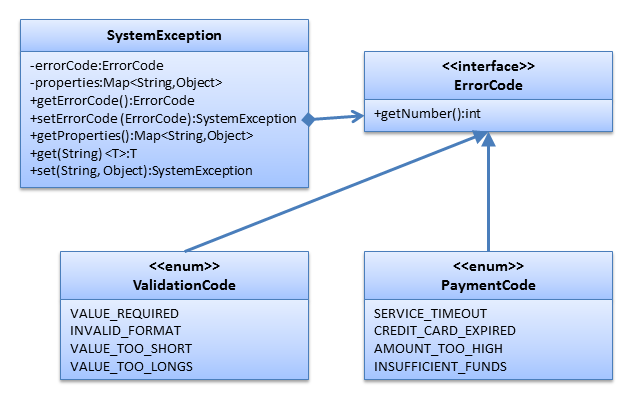
To avoid this, simply use enums to specify the exception type. Create one enum for each error category – payments, authentication, etcetera – and make the enums implement an ErrorCode interface. Also, reference it as a field in the exception.
When throwing exceptions, simply pass in the appropriate enum.
|
1 |
throw new SystemException(PaymentCode.CREDIT_CARD_EXPIRED); |
Now when you need to test for a specific case, just compare the exception’s code with the enum.
|
1 2 3 4 5 |
} catch (SystemException e) { if (e.getErrorCode() == PaymentCode.CREDIT_CARD_EXPIRED) { ... } } |
By using the error code as the resource bundle’s lookup key, you can now get user-friendly, internationalized text!
|
1 2 3 4 5 6 7 8 9 10 11 12 13 14 15 16 |
public class SystemExceptionExample3 { public static void main(String[] args) { System.out.println(getUserText(ValidationCode.VALUE_TOO_SHORT)); } public static String getUserText(ErrorCode errorCode) { if (errorCode == null) { return null; } String key = errorCode.getClass().getSimpleName() + "__" + errorCode; ResourceBundle bundle = ResourceBundle.getBundle("com.northconcepts.exception.example.exceptions"); return bundle.getString(key); } } |
3. Add error numbers to enums
In some cases, a numerical error code can be associated with each exception. HTTP responses are an example of this. For those cases, you can simply add a getNumber method to the ErrorCode interface and implement it in each enum.
|
1 2 3 4 5 6 7 8 9 10 11 12 13 14 15 16 17 18 |
public enum PaymentCode implements ErrorCode { SERVICE_TIMEOUT(101), CREDIT_CARD_EXPIRED(102), AMOUNT_TOO_HIGH(103), INSUFFICIENT_FUNDS(104); private final int number; private PaymentCode(int number) { this.number = number; } @Override public int getNumber() { return number; } } |
Numbering can be globally unique across all enums or each enum can be responsible for numbering itself. You can even use the implicit ordinal() method or load numbers from a file or database.
4. Add dynamic fields to your exceptions
Proper exception handling mandates for the recording of relevant data, not just the stack trace. This way, you will save time when trying to diagnose and reproduce errors. What’s more, customers won’t have to tell you what they were doing when your app crashed – you will already know and be on your way to fix it.
The easiest way to accomplish this is to add a java.util.Map field to the exception. The new field’s job will be to hold all your exception-related data by name.
You’ll also need to add a generic setter method following the fluent interface pattern.
Throwing exceptions, with relevant data, will now look something like this.
|
1 2 3 4 |
throw new SystemException(ValidationCode.VALUE_TOO_SHORT) .set("field", field) .set("value", value) .set("min-length", MIN_LENGTH); |
5. Prevent unnecessary nesting
Long, redundant stack traces not only do not help you, but they are also a waste of time and resources. When rethrowing exceptions, call a static wrap method instead of the exception’s constructor. The wrap method decides when to nest exceptions and when to just return the original instance.
|
1 2 3 4 5 6 7 8 9 10 11 12 13 14 15 |
public static SystemException wrap(Throwable exception, ErrorCode errorCode) { if (exception instanceof SystemException) { SystemException se = (SystemException)exception; if (errorCode != null && errorCode != se.getErrorCode()) { return new SystemException(exception.getMessage(), exception, errorCode); } return se; } else { return new SystemException(exception.getMessage(), exception, errorCode); } } public static SystemException wrap(Throwable exception) { return wrap(exception, null); } |
Your new code for rethrowing exceptions:
|
1 2 3 |
} catch (IOException e) { throw SystemException.wrap(e).set("fileName", fileName); } |
6. Use a central logger with a web dashboard
This is the bonus tip. Depending on your setup, accessing production logs can take some work, since it may require involving multiple go-betweens (since many devs may not have access to production environments).
If you are in a multi-server environment, things are even worse. Finding the right server — or determining that the problem only affects one server — can be quite a headache.
Here are my suggestions:
- Aggregate your logs in a single place, preferably a database.
- Make that database accessible from a web browser.
There are a number of methods and products to do this: log collectors, remote loggers, JMX agents, system monitoring software, etc. You can even build it yourself. Once you have it, you’ll be able to:
- Troubleshoot issues in a matter of seconds.
- Have a URL for each exception that you can bookmark or email around.
- Enable your support staff to determine root causes without involving you.
- Prevent testers from creating multiple tickets for the same bug. Plus they’ll have an exception URL to put in their ticket.
- Save money for your business.
And last but not least
- Keep your weekend and reputation intact.
What are your Tips?
I hope you find my tips useful. I have avoided many disasters and wasted hours by having the right info in my exceptions and having them easily accessible. If you have a few exception handling tips of your own, I’d like to hear them.
Download
The exceptions download contains the entire source code (including Eclipse project). The source code is licensed under the terms of the Apache License, Version 2.0.
Happy coding!